A lot of businesses assume that internal support inefficiency is simply a staffing issue.
While staffing can play a role, the deeper issue is often that too much internal support still depends on manual ticket handling, repetitive triage, and fragmented routing.
Common problems caused by inefficient internal support:
- Repetitive IT and service requests continually enter the queue
- Basic requests consume too much technician or support time
- Tickets are routed incorrectly or slowly
- Employees wait too long for simple answers
- Issues are repeatedly explained
- Low-complexity tickets sit beside urgent ones
- Support teams become the default routing engine
- Self-service is weak or poorly adopted
- Escalation happens too late
- Internal support quality is inconsistent
This is why IT and service desk automation matters it’s not just about answering tickets faster. It’s about improving workflows around internal support, helping employees get help more efficiently and ensuring service teams focus on what truly requires their expertise.
Why IT and Service Desk Inefficiency Matters More Than Most Organizations Admit
A lot of internal support friction is normalized. Employees get used to:
- Waiting on simple requests
- Not knowing where to submit issues
- Opening tickets for repetitive problems
- Asking people directly instead of using the system
- Following up repeatedly for status updates
- Bouncing between teams for resolution
Similarly, support teams become used to:
- Triaging manually
- Reclassifying tickets
- Routing requests by habit
- Answering the same questions repeatedly
- Chasing missing context
- Spending time on issues that should have been structured earlier
This leads to real cost in the form of:
- Slower employee productivity
- Higher support burden
- Inconsistent support experience
- Slower issue resolution
- Poor SLA performance
- Technician burnout
- Weak self-service adoption
This is why IT and service desk automation should not be treated as a convenience feature but as an internal operations efficiency lever.
What IT and Service Desk Automation Actually Means
Many people think of IT and service desk automation as just ticketing software. However, that’s too narrow a view.
A strong IT and service desk automation workflow can help businesses:
- Handle repetitive internal support requests
- Guide employees before they open a ticket
- Collect useful context during ticket intake
- Route requests to the right team faster
- Provide self-service for common issues
- Reduce unnecessary ticket volume
- Escalate exceptions properly
- Support access-related workflows
- Guide employees through standard support processes
- Improve internal support continuity
- Reduce manual triage and categorization effort
This is why IT and service desk automation should be seen as workflow automation for internal support intake, routing, and resolution movement—not just ticket management.
The Biggest Mistake Businesses Make with Service Desk Automation
A common mistake is trying to automate ticket handling without first defining which requests are good candidates for automation and self-service.
When done poorly, this leads to:
- Unhelpful automation
- Bad ticket classification
- No useful next-step guidance
- Employees bypassing the system
- Poor escalation experiences
- Support teams distrusting the workflow
- Self-service being treated as a barrier instead of a help path
The better model is to automate repetitive internal support paths, improve intake and routing logic, and preserve clean human escalation for complex or sensitive issues.
The 5 Stages of a Strong IT and Service Desk Workflow
1. Request Intake
Employees need help with various issues, such as:
- Access or login issues
- Policy or process confusion
- IT support
- Service requests
- Hardware problems
- Internal system questions
- Request status updates
- Approval-related support
The system should recognize the request type early to route it appropriately.
2. Intent and Context Collection
What is the employee trying to do? Examples include:
- Restore access
- Troubleshoot
- Request something
- Understand a process
- Escalate an issue
- Find a support path
- Get status on an internal request
This is where service desk workflows become more useful than just a generic inbox.
3. Self-Service, Guidance, or Routing
For repetitive and straightforward issues, the workflow should:
- Provide the relevant answer or guidance
- Offer next steps and reduce unnecessary ticket creation
- Collect structured information to move the request into the right path
If a ticket is needed, the workflow should ensure smooth handoff into it.
4. Escalation and Assignment
When a human is needed, the system should:
- Gather the right context
- Route the request properly
- Reduce repeated explanations
- Preserve urgency signals
- Avoid sending tickets to the wrong queue
This improves internal support efficiency significantly.
5. Resolution Continuity
A strong service desk workflow should also help with:
- Request status visibility
- Reduced follow-ups
- Continuity for unresolved issues
- Clarity around handoffs
- Consistency in the support experience
This keeps internal support from becoming fragmented and disjointed.
Why Repetitive Requests Are the Best Place to Start
A lot of businesses make service desk automation too complex by trying to automate difficult edge cases first.
The best starting point is usually repetitive, structured, high-frequency request types.
Examples include:
- Password reset guidance
- Access request basics
- Software installation requests
- Login issues
- System or device setup guidance
- Status questions
- Internal request routing
- Standard service desk FAQs
- Employee onboarding support requests
- Policy-related internal help
Why start here?
These requests are:
- High-frequency
- Low-variance
- Operationally expensive when answered repeatedly
- Easy to measure
- Easier to standardize
This is where service desk automation can provide quick efficiency gains.
Why Ticket Queues Pile Up Even When Teams Are Working Hard
A lot of ticket backlog problems aren’t caused by a lack of effort. They’re caused by inefficient workflows.
Queues grow because:
- Too many simple requests enter the queue
- Context is missing at intake
- Requests are routed poorly
- Employees create tickets for things that should have self-service paths
- Urgent and non-urgent issues are mixed together
- Support teams waste time on avoidable triage
- Repeat tickets keep returning
This is why scaling service desks by effort alone often fails. The structure around requests is just as important as the volume.
Best Businesses for IT and Service Desk Automation
This pillar is especially valuable for:
- Mid-market businesses
- Enterprise teams
- Distributed teams
- IT-heavy environments
- Service-led organizations
- Companies with growing employee support volume
- Multi-location businesses
- Businesses with recurring access, setup, or request-routing issues
- Organizations onboarding employees regularly
In these environments, internal support drag compounds quickly if workflows are not better structured.
What Businesses Should Automate First
Do not try to automate every ticket type at once.
The smartest first use cases usually include:
- Repetitive internal FAQs
- Basic IT and access issues
- Request intake guidance
- Ticket routing logic
- Status and next-step queries
- Onboarding-related IT support
- Standard service requests
- Context collection before escalation
These workflows are closely tied to measurable support outcomes.
You can track:
- Repetitive ticket reduction
- Self-service success rate
- Ticket-routing accuracy
- Manual triage reduction
- First-response improvement
- Escalation rate
- Ticket deflection
- Internal support workload saved
The Difference Between a Ticketing System and a Service Desk Workflow
This distinction matters.
A ticketing system merely records requests. A service desk workflow helps employees move from an issue to resolution more efficiently.
Key elements of a service desk workflow:
- Better request intake
- Self-service options before ticket creation
- Stronger routing logic
- Context collection
- Escalation rules
- Continuity for status and resolution
This is much more valuable than just storing tickets in a queue.
Businesses should not just ask: "Do we have a ticketing tool?" They should also ask:
- Are repetitive tickets still flooding the queue?
- Are employees getting fast help for common issues?
- Where is triage wasting time?
- Which ticket types should never have needed manual handling first?
- How do we reduce internal support friction without making employees fight the system?
That’s where the real value lies.
A Practical IT and Service Desk Automation Framework
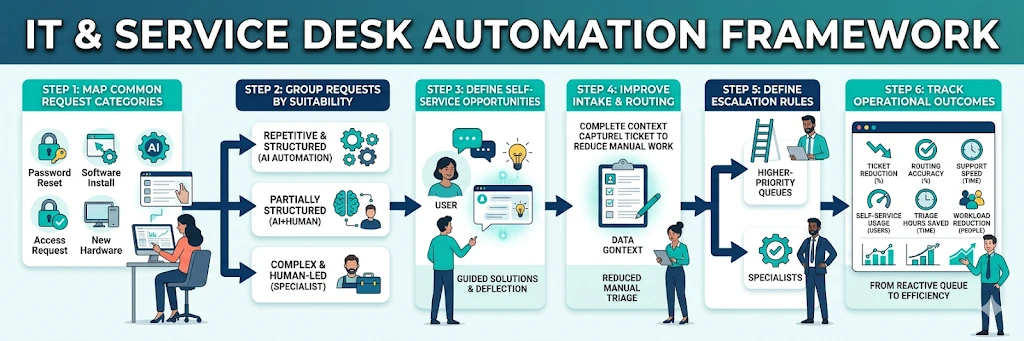
Use this framework to launch or improve internal support automation.
1. Map Common Request Categories
Identify which internal request types occur most often.
2. Group Requests by Suitability
Separate:
- Repetitive and answerable
- Partially structured
- Complex and human-led
3. Define Self-Service Opportunities
Which issues can be resolved without a human ticket?
4. Improve Intake and Routing
What context should be captured to reduce manual triage?
5. Define Escalation Rules
When should a request move to a specialist or higher-priority queue?
6. Track Operational Outcomes
Measure:
- Ticket reduction
- Routing accuracy
- Support speed
- Self-service usage
- Manual triage saved
- Support-team workload reduction
This framework turns service desk support into a structured system rather than a reactive queue.
Conclusion
IT and service desks often struggle not because of demand, but because too much of that demand is still entering the system inefficiently.
IT and service desk automation helps businesses:
- Reduce repetitive ticket burden
- Improve request routing
- Strengthen self-service options
- Reduce manual triage
- Speed up internal support
- Improve employee experience
- Make service teams more efficient
So before asking: "Do we need more service desk capacity?" ask: "How much of our current internal support load is repetitive enough to be handled better through structured workflows, stronger intake, and better routing?"
That’s often where the bigger efficiency opportunity lies.
Want to see where your internal support workflow is creating unnecessary ticket volume and routing friction?
See how to automate: Repetitive IT requests, Request intake, Routing, Self-service guidance, Escalation logic, Internal support continuity,
FAQs
What is IT and service desk automation?
It is the use of structured workflows to improve internal support intake, self-service, routing, escalation, and repetitive request handling across IT and service desk functions.
Why does service desk automation matter?
Because repetitive internal tickets, weak intake, and poor routing create major hidden support burdens and slow employee productivity.
What should businesses automate first?
Usually repetitive ticket types, request intake guidance, ticket routing, basic access or login support, and standard internal support FAQs.
Is this useful only for large enterprises?
No. It is useful for any business where internal support requests are frequent enough to interrupt teams repeatedly.
How do you avoid poor service desk automation?
Start with repetitive, structured requests, use strong routing logic, and preserve clear human escalation for exceptions.