Cloud Kitchens are growing rapidly but so are their operational challenges. With rising order volume, multiple delivery platforms, fluctuating staff availability, and high customer expectations for faster responses, running a cloud kitchen efficiently has become harder than ever.
Most cloud kitchens today still handle customer queries manually, rely on inconsistent follow-ups, and struggle with repetitive operational tasks. This leads to:
- Lost orders due to slow responses
- High dependency on phone calls
- Poor customer experience
- Increased operational chaos
- Higher staff costs
- Limited visibility into real daily workflows
This is where AI automation, specifically verticalized platforms like Converiqo, becomes a game-changer.
Instead of adding more staff, Cloud Kitchens can now automate customer engagement, order tracking, internal coordination, and repetitive workflows resulting in higher revenue and lower operational cost without changing business processes.
Challenges Cloud Kitchens Face Today
Cloud kitchens experience recurring pain points:
1. Slow response times → lost orders
Customers ask for menu items, prices, availability, order status — and if the response takes more than 60 seconds, the probability of losing that order increases sharply.
2. High dependency on front-line staff
During peak hours, staff can’t handle WhatsApp, Instagram, calls, aggregators and dine-in simultaneously.
3. Poor real-time coordination with delivery partners
Order delay updates, packaging issues, item availability, peak-hour coordination—everything becomes manual and error-prone.
4. Inefficient follow-up for repeat customers
Repeat revenue is free revenue, but most cloud kitchens don’t have structured strategies to re-engage previous customers.
5. Manual complaint handling
Customers often complain about delays, missing items, temperature issues, wrong packaging — and resolution becomes inconsistent.
6. Limited visibility across daily operations
Owners struggle to track:
- Inquiry → Order outcomes
- Repeated staff mistakes
- Drop-offs
- Peak hour patterns
- Customer feedback trends
AI automation solves all of this.
Where AI & Automation Help Cloud Kitchens (Practical, Not Hypothetical)
Below are the real, high-impact areas where cloud kitchens benefit immediately from AI automation:
1. Automated customer engagement (WhatsApp, Web, Instagram)
The AI responds instantly to:
- Menu queries
- Special dishes
- Prices
- Preparation time
- Delivery radius
Instant responses = more orders closed.
2. Order capture & follow-up automation
AI collects:
- Item list
- Quantity
- Custom instructions
- Delivery details
And can share:
- Payment links
- Order confirmation
- ETA updates
- Delivery partner details
3. Abandoned order recovery
70% of food orders get abandoned.
AI identifies them and sends:
- Gentle reminders
- Deals
- Alternative dishes
- Follow-up messages
Cloud kitchens typically see 12–25% recovery.
4. Automated feedback loops
After delivery, the AI triggers:
- Rating requests
- Issue reporting
- Review encouragement
This improves ratings on:
- Zomato
- Swiggy
- Google Reviews
5. Repeat order nudges
AI identifies past orders and proactively sends:
- Personalized recommendations
- Combo suggestions
- Weekly meal reminders
6. Internal workflow automation
Tasks automatically route to:
- Kitchen staff
- Packaging
- Delivery coordinator
- Inventory team
This reduces communication errors drastically.
Use Cases: How Cloud Kitchens Use AI in Real Life
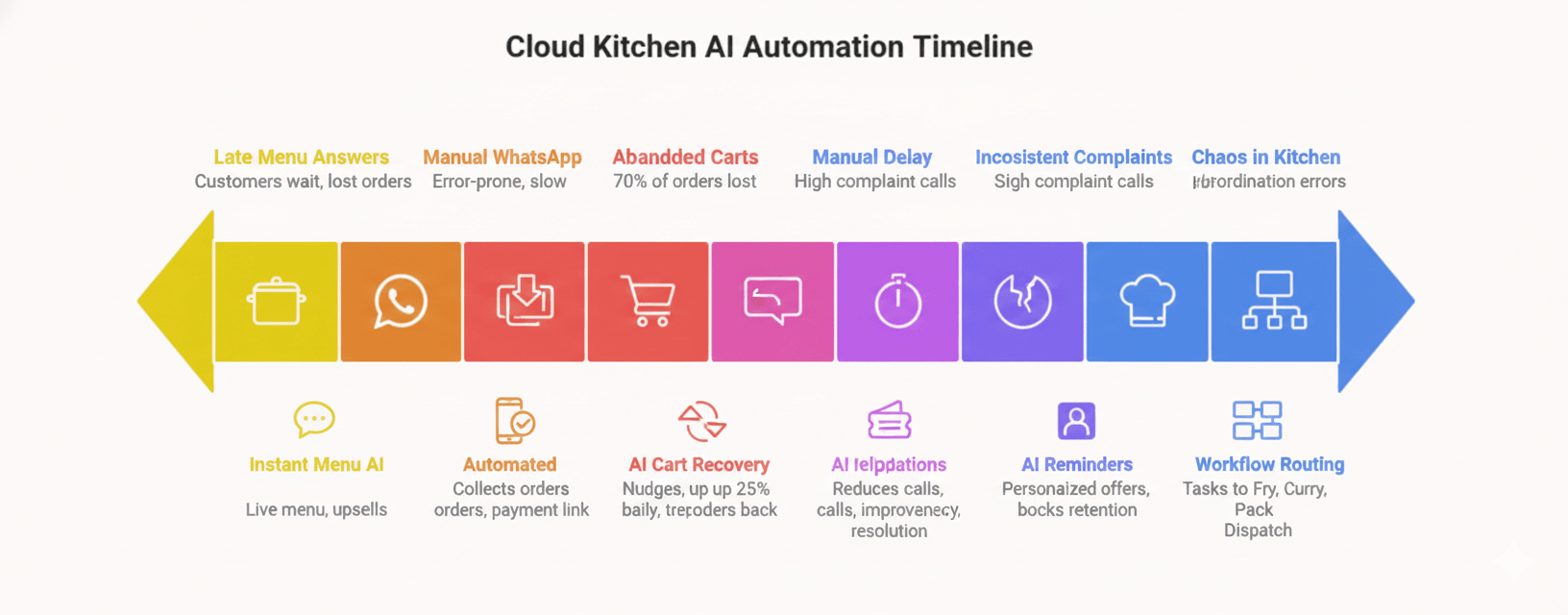
Here are 7 high-impact workflows that Cloud Kitchens deploy immediately:
1. Instant Menu Query Response
Problem: Customers ask “What’s available?” and staff often respond late.
AI Workflow: AI shares the live menu + specialty dishes + upsells.
Outcome: Higher conversion, better customer experience.
2. Order Taking Through WhatsApp
Problem: Suits local customers who prefer WhatsApp over apps.
AI Workflow:
- Collects dish selection
- Confirms quantity
- Suggests add-ons
- Sends a payment link
- Triggers order.
Outcome: Zero manual handling.
3. Abandoned Cart / Incomplete Order Follow-up
AI identifies:
- Dropped conversations
- Half-written orders
- “Thinking…” responses
And sends follow-up nudges.
Recovery rate: up to 25% extra orders.
4. Delay / Inventory Notifications
If kitchen delays increase:
- AI informs customers
- Reduces complaint calls
- Improves transparency
5. Customer Complaint Resolution
AI collects:
- Missing items
- Wrong dish
- Delay issues
- Refund or replacement requests
And routes them to the right internal queue.
6. Repeat Order Promotion
AI analyzes buying history and sends customized reminders:
- “Your last order was 10 days ago — want it again?”
- “Try our chef’s special today!”
Boosts retention significantly.
7. Kitchen Staff Workflow Routing
AI routes tasks to:
- Fry station
- Curry station
- Packaging
- Dispatch
No chaos, no manual coordination.
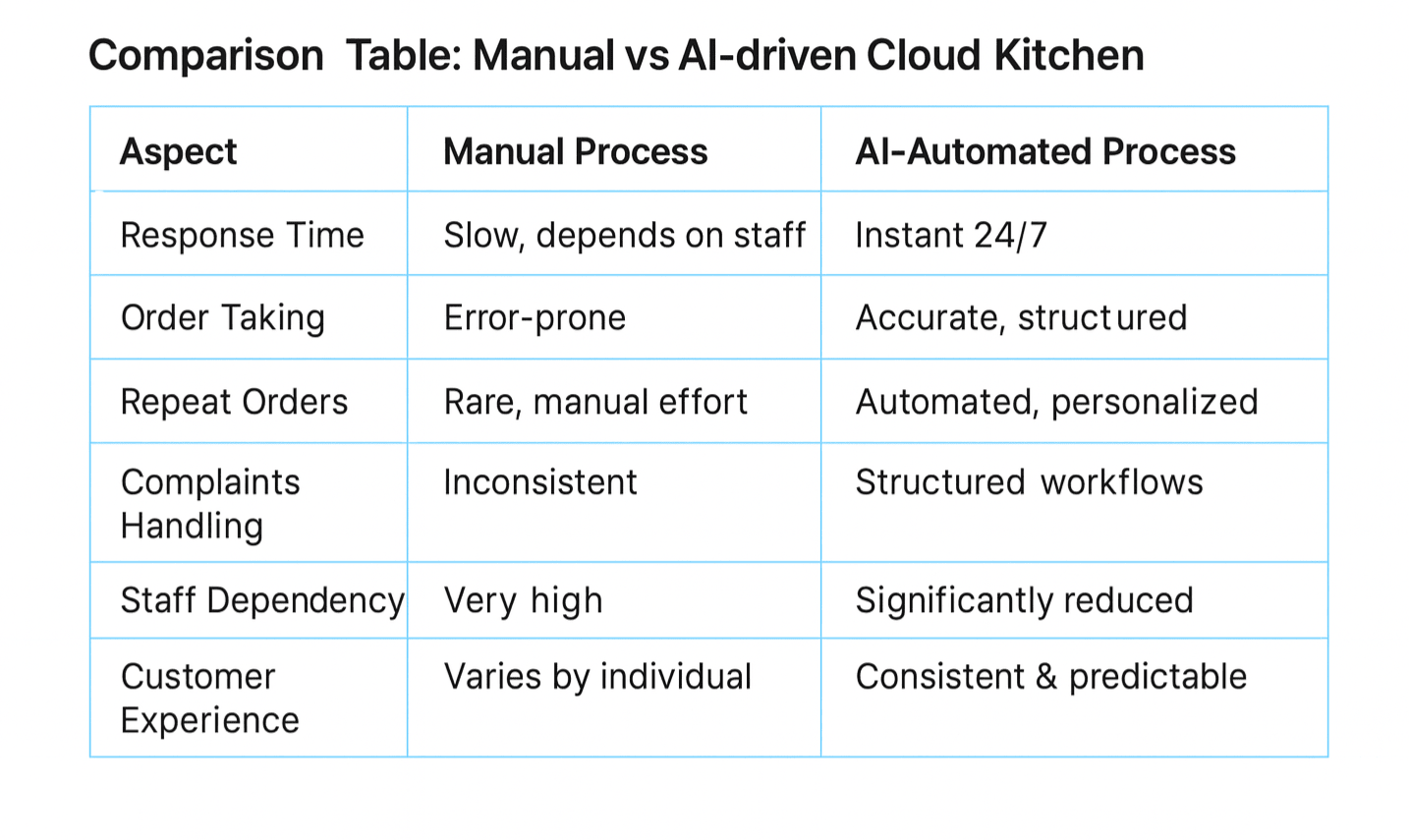
What to Look For in an AI Platform for Cloud Kitchens
Your AI platform must include:
- Pre-built workflows for food ordering
- Multi-channel support (WhatsApp, Website, Instagram)
- Order-taking + payment link flow
- Delay & issue management
- Kitchen staff routing
- Integration-ready APIs
- Analytics & reporting
Converiqo already provides pre-trained, industry-specific flows for Cloud Kitchens, which drastically reduces setup time.
Example Workflow: How AI Handles a Full Cloud Kitchen Interaction
Customer → “What’s today’s special?”
AI shares items + price + prep time.
Customer → “Place the order.”
AI collects quantity + preferences.
AI → Sends payment link
Customer completes payment.
AI → Alerts kitchen team
Order enters prep queue.
AI → Sends ETA update
Live order transparency.
AI → Sends delivery notification
Customer feels updated.
AI → Sends post-delivery feedback message
Improves ratings.
AI → Logs ticket if issue arises
No manual involvement needed.
How Cloud Kitchens Can Implement AI Automation in 2–3 Weeks
Step 1: Identify Top 3 Repetitive Workflows
(Orders, menu queries, feedback.)
Step 2: Connect WhatsApp & Website
This is the main customer interface.
Step 3: Start With 1 or 2 Modules
Lead handling + customer self-service.
Step 4: Train the Bot with Menu + Policies
No extra technical work required.
Step 5: Go Live in Stages
Start with peak-hour workflows → expand to feedback → internal routing.
Conclusion
Cloud Kitchens operate under extreme time pressure and require predictable communication, faster responses, fewer errors and higher order conversion. AI automation gives you exactly that — without adding new staff.
With AI-powered workflows, Cloud Kitchens can:
- Increase order volume
- Reduce customer support load
- Improve customer experience
- Boost repeat purchases
- Simplify internal coordination
Platforms like Converiqo offer ready-made, pre-trained workflows designed specifically for Cloud Kitchens, enabling them to adopt automation quickly with minimal effort.
FAQs
1. How can AI help Cloud Kitchens reduce operational workload?
AI automates order taking, menu queries, customer updates and complaint handling—reducing staff effort by 40–60%.
2. Can AI handle WhatsApp and Instagram orders?
Yes. Converiqo automates conversations, collects orders, sends payment links and tracks completion through messaging platforms.
3. Is AI automation expensive for small Cloud Kitchens?
No. Cloud Kitchens can start with 1–2 modules and scale as order volume grows.
4. Does AI integrate with POS or delivery platforms?
Yes. Converiqo offers API connectors for POS, printers, CRMs and delivery apps.
5. How soon can a Cloud Kitchen go live with automation?
Most kitchens start seeing results within 7–14 days.
About the Author
Himani Chaudhary
Ready to orchestrate your AI future?
Converiqo AI helps you design, deploy, and scale automation workflows that move your business faster, leveraging specialized solutions like our AI bot platform for lead generation, customer self-service AI bot platform, employee self-service AI bot platform, retail omnichannel automation, and our detailed guides on how agentic AI bot platforms work in enterprises and cost structure of enterprise AI bot platforms. Connect with our team to see the platform in action and co-create the next chapter of intelligent operations.
Read More Blogs
Discover more insights and product updates curated by the Converiqo AI team.
Real ROI of Field Force Automation - Beyond the Activity Dashboard
Four metrics that show real field force automation ROI in India - productivity, data reliability, throughput, and field attrition - not just the activity dashboard.
Beat Planning Is the Highest-Leverage Field Force Capability - Here Is Why
Beat planning decides coverage, call frequency, and whether field time is productive. Why it is the single highest-leverage field force automation capability.
Why an Indian Field Force App Has to Work Offline - and Be Built for Real Devices
Field work in India happens where connectivity is intermittent. A field force app that assumes constant connectivity fails exactly where field work is done.